
Skip to content
EMPOBase
en
An EMPO product

Bring your programs, operations and evidence together.

Connect project plans, field reporting, finance operations, people and logistics in one workspace — so your team can follow work from request to approval to reporting.

Interface in 9 languages — English, Myanmar and Arabic fully translated.

Executive overview — illustrative preview with sample data
Built for humanitarian teams worldwide
  • NGOs
  • CSOs
  • Country offices
  • Regional teams
  • Global programmes
One connected workflow

Follow one number from the field to the report.

Each step names the role that acts, the rule the server enforces at that moment, the record it leaves behind and who holds it next. This is the short version of the field-to-results chain.

  1. Who acts

    A MEAL lead with write access to the project

    Opens a collection link for one indicator and period.

    What the server enforces

    Creating or revoking a link needs the MEAL write capability, and the link is scoped to one tenant.

    What it leaves behind
    A tokenised collection link, listed and revocable.
    Next owner
    A field enumerator or partner
  2. Who acts

    A field enumerator or partner

    Submits the value through the link.

    What the server enforces

    The submission is stored as pending. A retry carrying the same key returns the original instead of creating a second one.

    What it leaves behind
    A pending submission with its submitter, note and timestamp.
    Next owner
    A reviewer with approve access to that project
  3. Who acts

    A reviewer with approve access to that project

    Reads the submitted value beside the recorded actual, then approves or rejects it.

    What the server enforces

    Approval is project-scoped, only a pending submission can be reviewed, and a second reviewer acting at the same moment is told the decision was already taken.

    What it leaves behind
    A decision with its reviewer, timestamp and note.
    Next owner
    The system, on approval only
  4. Who acts

    The system, on approval only

    Writes the approved value into the indicator actual for that project, indicator and period.

    What the server enforces

    Only an approval writes an actual. A pending or rejected submission never reaches results, and a corrected figure replaces the old one rather than adding to it.

    What it leaves behind
    An indicator actual carrying the source it came from.
    Next owner
    Programme and MEAL reporting
  5. Who acts

    Programme and MEAL reporting

    Reads the rollup across the project’s indicators.

    What the server enforces

    An unapproved custom indicator is skipped by the rollup entirely.

    What it leaves behind
    A rollup built only from approved indicators and accepted actuals.
    Next owner
    End of the chain.
Read the full chain, with what it does not do
Where to start

Three ways into the same workspace.

Leadership and country directors

See which capability groups share one database, one login and one audit trail, where records hand off between modules, and exactly where the scope stops.

See the platform

Programmes and MEAL

Follow a field submission through review to an accepted actual, and see why a pending or rejected value never reaches a donor report.

Field to results

Finance and operations

Follow a requisition through its approval chain to a purchase order, a goods receipt and a posted, balanced journal — and read where EMPOBase stops.

Procure to pay

You didn't have to build this

235 indicators, pre-loaded.

Most humanitarian platforms hand you a framework and a blank slate. EMPOBase ships with the framework already populated — the modules wired, the indicators loaded, the templates aligned to PCM, CHS and Sphere.

235

Humanitarian indicators

WASH, Health, Education, Protection, Food Security, Livelihoods, Shelter, Nutrition. Each with documented numerator, denominator, frequency and disaggregation.

9

Portal modules, pre-wired

HR · Finance · Programs · MEAL · Documents · Governance · Logistics · Donors · Field reporting. They already know about each other.

9

Interface languages

English, Myanmar and Arabic are fully translated; six more are partial and fall back to English. Every plan, including Free, includes all nine.

Module Explorer

Not one workflow — your whole operation, in one portal

Nine modules on one database, one login and one audit trail. Open a module to see what’s inside — every label below is the exact name you’ll find in the product. Start with what you need today; the rest is there when you grow into it.

9 modules · one database · one audit trail

  • Staff Directory
  • Recruitment Pipeline
  • Onboarding
  • Leave & Compensation
  • Performance Management
  • Learning & Training
  • Safeguarding & PSEA
  • HR Analytics

Safeguarding & PSEA and Duty of Care are built in — not bolted on.

Salary records sit behind their own compensation permission; approved timesheets post labour cost to the Finance ledger.

  • Org Chart
  • Leave Calendar
  • Recruitment
  • Contract Renewals
  • Offboarding
  • Talent Management
  • Competency Framework
  • HR Compliance
  • Grievance & Disciplinary
  • Staff Wellbeing
  • Duty of Care
  • Staff Surveys
  • Emergency Planning
  • Compensation & Benefits
See how it connects on the platform

  • Payment Requests
  • General Ledger
  • Budget vs Actual
  • Grant Finance
  • Restricted Funds
  • Cash Management
  • Bank Reconciliation
  • Financial Statements

Cash Management spans Balances · Accounts · Movements · Reconciliation · Pay Requests.

Restricted Funds tracked with Budget vs Actual per grant.

Balanced double-entry journals, server-enforced period locks and reversal entries — no silent edits to posted figures.

  • Petty Cash
  • Cash Advances & Claims
  • Pending Reclassification
  • Budget Health
  • Sub-Grants
  • Functional Expenses
  • Cash Flow Forecast
  • Reporting Calendar
  • Chart of Accounts
  • Cost Centers
  • Cost Allocation
  • Exchange Rates
  • Recurring Journal Entries
  • Period Closing
  • Payroll
See it in the procure-to-pay workflow

  • Monitoring
  • 3W Coverage (Who does What Where)
  • Reporting
  • Risk & Learning
  • Complaints & Feedback (CFM)

A 235-indicator library and results frameworks tied to Programs.

See it in the field-to-results workflow

  • Programs
  • Projects
  • Donors
  • Project Charter
  • RACI
  • Field Operations
  • Closure Checklist

The Project DPro toolkit with RACI and change control, from charter to After Action Review.

  • Reporting
  • Stakeholders
  • Organogram
  • After Action Review
See how it connects on the platform

  • Procurement
  • Goods Receipt Notes
  • Inventory
  • Reorder Alerts
  • Assets
  • Vendors
  • Vendor Scorecard

Procurement routes approvals through L1–L5 Degree-of-Authority levels.

Vendor Scorecard keeps supplier performance on the record.

  • Asset Depreciation
  • Donations
  • Grants
  • Governance
See it in the procure-to-pay workflow

  • Global Search
  • Project Files
  • Templates Library
  • Pending Review
  • Expiry Tracker
  • Spaces: Foundational · Strategy & Planning · Finance · People & HR · Operations · Programs & MEAL

Expiry Tracker plus a Pending Review workflow keep documents from going stale.

  • Recent Documents
  • What's New
See how it connects on the platform

  • SMC Management
  • Risk Register
  • Risk Heatmap
  • Conflict of Interest
  • Whistleblower
  • Compliance Tracker
  • Compliance Calendar

SMC decisions, the Risk Register, Conflict of Interest and Whistleblower live side by side.

  • SMC Decisions Log
  • Accountability
  • Document Retention
  • Annual Reports
  • Governance Calendar
  • Role Authority
See how it connects on the platform

  • External access Sessions
  • Queries
  • Access Logs
  • Preparation
  • Donor / audit portal seats per plan (1 → 5 → 15 → unlimited)

Every external session is scoped, logged and read-only — auditors see exactly what you share, nothing else.

See how it connects on the platform

  • Field Operations
  • SitReps
  • Beneficiary Registry
  • Collection links (no-account shareable field data + review queue)
  • Incident reports

Collection links stage field submissions for review — only approved ones become MEAL actuals.

See it in the field-to-results workflow

Fullest admin view — what each user sees scales by role and plan.

A closer look

Three stops inside the portal

Finance

Grant-ready fund control around your ledger — not your statutory books.

  • Payment Requests
  • General Ledger
  • Budget vs Actual
  • Grant Finance

Cash Management spans Balances · Accounts · Movements · Reconciliation · Pay Requests.

Finance — Staff Dashboard view

Field Reporting

Capture field data even without accounts.

  • Field Operations
  • SitReps
  • Beneficiary Registry
  • Collection links (no-account shareable field data + review queue)

Collection links stage field submissions for review — only approved ones become MEAL actuals.

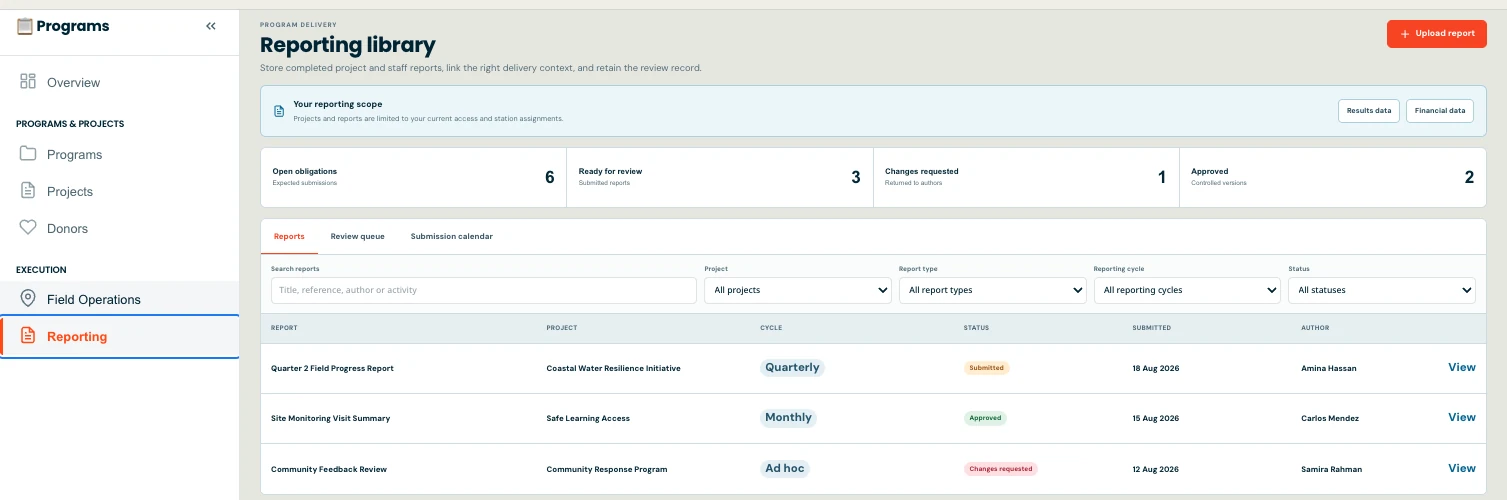
Reporting library with fictional field reports, review states, and submission metrics.
Field Reporting — Staff Dashboard view

Donors & Audit Portal

Give donors and auditors their own scoped, read-only window.

  • External access Sessions
  • Queries
  • Access Logs
  • Preparation

Every external session is scoped, logged and read-only — auditors see exactly what you share, nothing else.

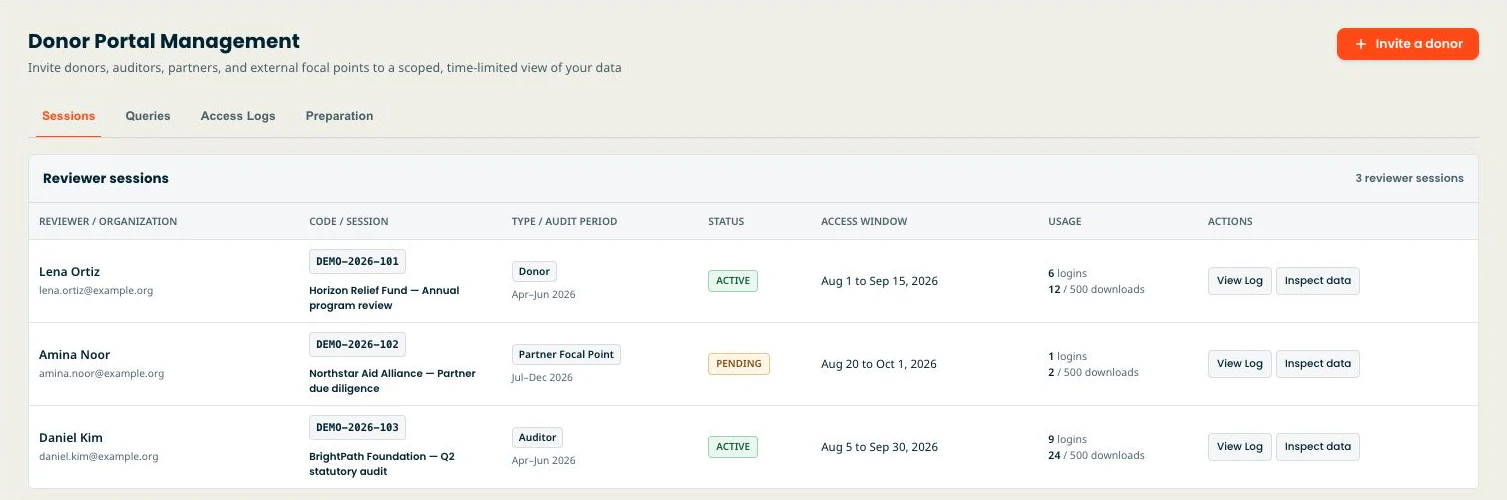
Donor Portal Sessions with three synthetic showcase reviewer sessions.
Donors & Audit Portal — Staff Dashboard view

One platform core under every module

Shared by all nine modules, so nothing needs stitching together.

  • Executive Overview dashboard
  • Announcements
  • AI assistant — RAG over your knowledge hub, drafting help, bring-your-own-key on every plan
  • Settings — Roles & Permissions, Stations, Security, Audit log, Branding, Backup…
  • Workflows launcher
MEAL

MEAL without the spreadsheet sprawl

A 235-indicator humanitarian library, results frameworks per project, and dashboards that update as field data lands. You stop maintaining sixteen overlapping spreadsheets and start reading them.

  • 235 pre-loaded humanitarian indicators across 8 sectors
  • Results framework + log frame in one place, with traceability
  • Live dashboards filtered by camp, district, partner, donor
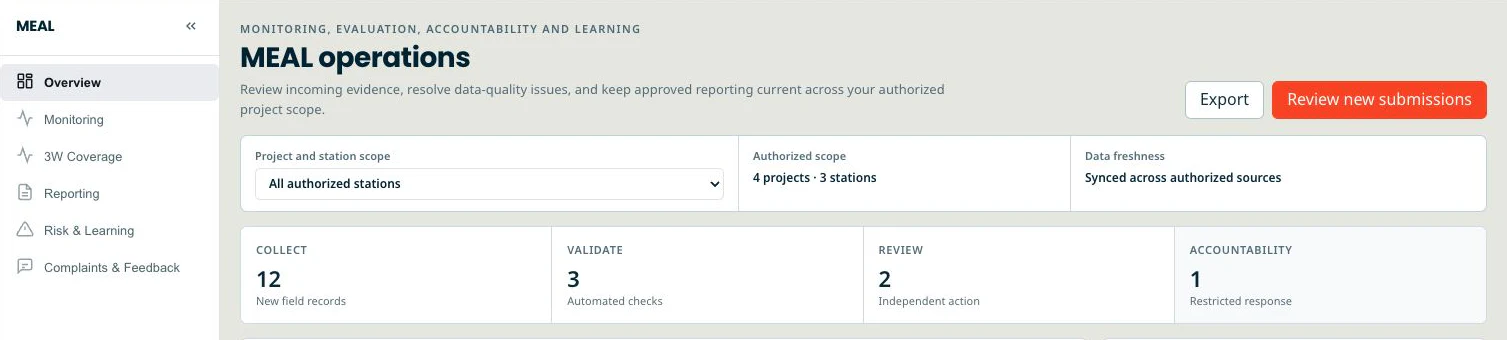
Staff Dashboard overview with authorized scope and Collect, Validate, Review, and Accountability workflow counts.
People

HR built for field staff

A staff directory that knows the difference between a national officer in Bago and a regional consultant in Bangkok. Leave, timesheets, compensation and safeguarding declarations live where they belong — and approved timesheets post labour cost to the ledger.

  • Staff directory with role, duty station, line manager, contract end
  • Leave types and policy caps you define, with public holidays built in
  • Safeguarding declarations as a renewable record, not a one-time PDF
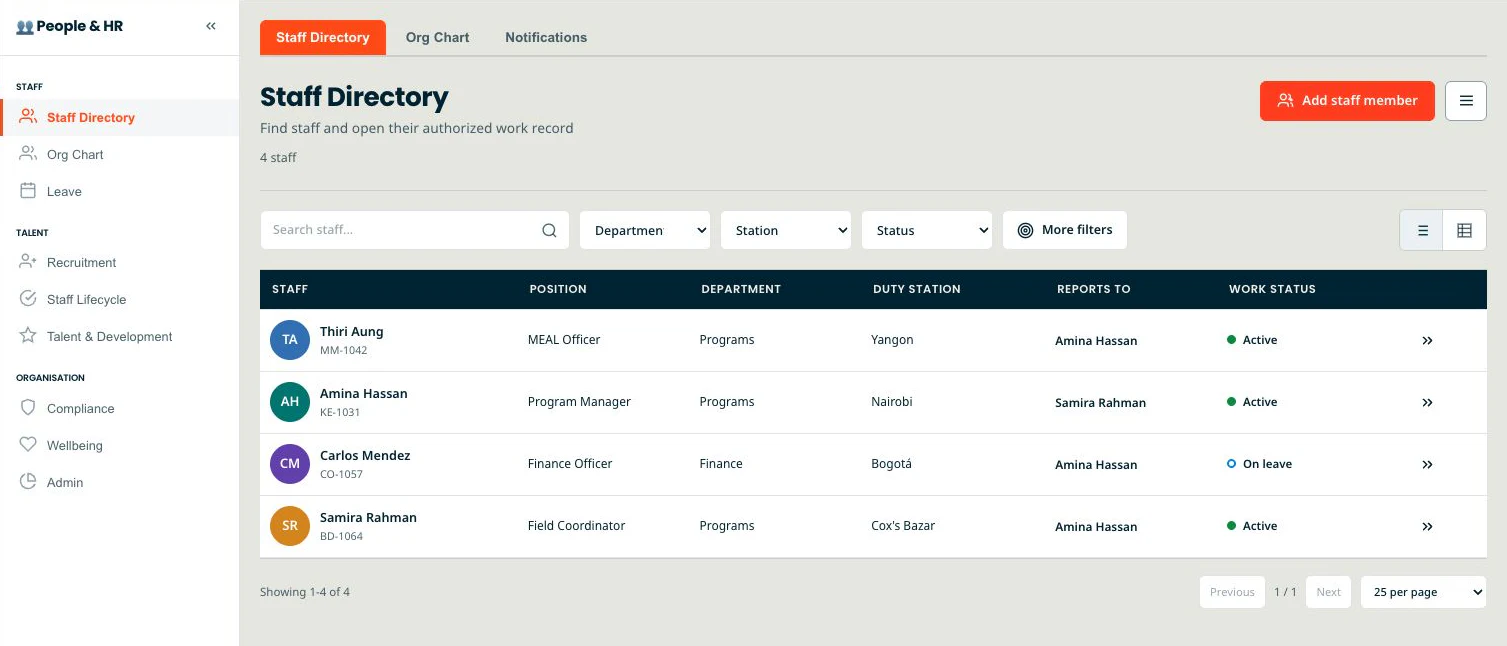
Staff Directory with filters, work status, and four synthetic showcase staff records.
Programs

Programs that follow Project DPro out of the box

The full PMD Pro / Project DPro toolkit ships with the portal. Problem tree, objective tree, log frame, RACI, change control and stakeholder register — pre-wired together, not invented per project.

  • Problem tree → objective tree → log frame, linked end to end
  • RACI matrix that knows about your real staff directory
  • Change-control board with versioned approvals
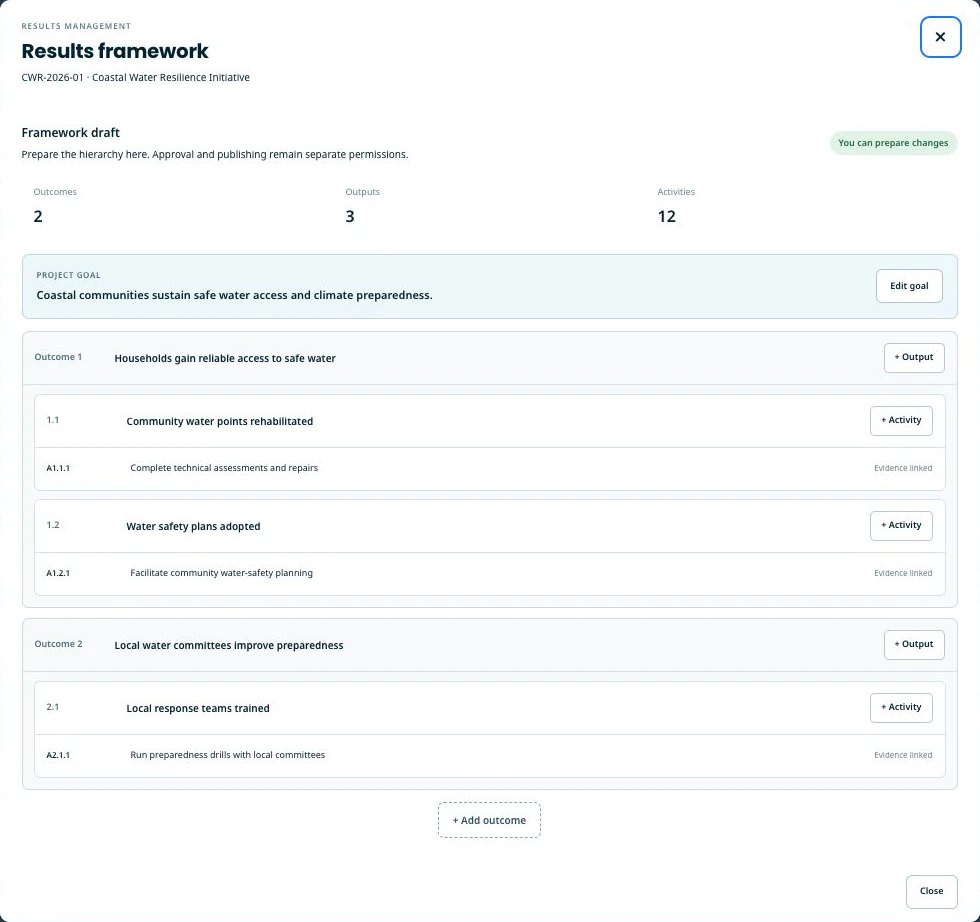
Results framework editor with a synthetic goal, outcomes, outputs, and activities.
Trust boundaries

What we can show you, and what we do not claim.

The security page lists the controls that exist today, the ones that are planned, and every sub-processor that handles your data, with where it is processed. The privacy notice sets out the commitments on data ownership, sensitive programme data, explainable access, export and deletion — and how to request our DPA terms. Both are written to be read by a procurement reviewer, not to reassure.

Last reviewed: . No third-party certification is claimed, and no audit report is implied.

Implementation fit

What you need before you start.

Bring these with you

  • Your own indicators or the ones you want from the pre-loaded library, and the periods you report on.
  • Your report and form templates, in the shape you already use them.
  • A staff list, and a decision about who approves what — the approval chains follow your roles, not ours.

What support covers

Email support and a walk-through with someone who knows the product. Data migration, template rebuilding and role design are work you do, with our help on the parts that touch the product.

We do not quote a setup duration. How long it takes depends on how settled your indicators, templates and approval roles already are.

Why EMPOBase

Stop running four tools that don't talk.

Humanitarian point tools are excellent at one workflow. Generic business software is excellent at one function across any sector. Most country offices end up running four or five of them — M&E in one place, books in another, dashboards somewhere else, project plans in a fourth tool. EMPOBase ships them together, pre-loaded with humanitarian context, so your first project starts from a working structure.

Scroll →

Comparison of EMPOBase against humanitarian point tools and generic business software
Capability EMPOBase Humanitarian point tools Generic business software
Operational scope 9 modules: HR, Finance, MEAL, Programs, Documents, Governance, Logistics, Donors, Field reporting One workflow (M&E indicators OR field data collection) One function (books OR dashboards OR projects)
Pre-loaded humanitarian context 235 indicators, PCM / CHS / Sphere, Project DPro toolkit Partial (some indicator libraries) None — built for any sector
Built around field operations (camps, districts, partners, donors) Yes — humanitarian-native Yes No — built for offices
Field reporting suite 6 report types (SitRep, Activity, MEAL, etc.) — online; offline mode on roadmap Yes (one type) No
Multilingual interface by default 9 interface languages — English, Myanmar and Arabic fully translated; six more partial with English fallback Variable, often EN-only English-default, localisation as add-on
Pricing

Honest pricing for honest budgets.

Free forever for solo M&E consultants. Paid tiers from $35/month when your country office grows. Annual saves you two months. No inflated list rate, no enterprise upcharge for humanitarian teams.

Questions we get a lot

FAQ.

How is EMPOBase different from existing tools?

We replace the patchwork. Humanitarian point tools (M&E platforms, field data collection) handle one workflow well. Generic business software (accounting, BI, project management) handles one function across any sector. Most country offices end up running four or five separate tools that do not talk to each other. EMPOBase ships HR, Finance, MEAL, Programs, Documents, Governance, Logistics, Donors and a 6-type field-reporting suite as one tenant — pre-loaded with 235 humanitarian indicators and the full Project DPro toolkit. Your country office starts from a working structure instead of a blank slate, with the tools already wired together.

Can I move my existing field-data forms in?

Yes. From the Team tier upward, you can import XLSForm definitions and field submissions. We map your existing question codes to our indicator library so your historical data stays attached to its indicators.

What languages?

Nine interface languages are live today. English, Burmese and Arabic are fully translated (Arabic with full right-to-left support). Spanish, French, Portuguese, Bahasa Indonesia, Swahili and Russian are partially translated — untranslated screens fall back to English. Every plan, including Free, includes all nine — language is not a plan lever. Need another language? Talk to us.

Where is the data stored?

Google Cloud (asia-southeast1 — Singapore). Enterprise can run on a dedicated single-tenant instance; pinning data to a specific region (e.g. EU residency) is on our roadmap.

Can I get a dedicated instance?

Yes — that is the Enterprise tier. Dedicated single-tenant deployment, your own URL, single sign-on that we provision for you under the agreement (it is not self-serve), your own AI provider key, and a custom DPA. (Pinning data to a specific region is on our roadmap.)

Who is EMPO?

EMPO Training & Consultancy Services is the parent organisation behind EMPOBase. EMPO trains humanitarian and development teams in PCM, CHS and MEAL in Myanmar, founded in 2025. EMPOBase is the productisation of the portal we built running our own and partner NGOs.

Start with your own project.

Free to try. No card. Bring your first project in with your own data and templates.